
A planning notebook for Mac, iPhone and iPad
Your notes. With the maths built in.
Plan a trip, split a bill, or work out an idea. Your words and numbers, in one private notebook.
Rent that’s fair to the box room.
Different rooms. Fair shares. #home/flat
# Rent that’s fair to the box room.
Different rooms. **Fair shares.** #home/flat

- [x] Measure the three rooms
- [ ] Send everyone the breakdown

```calc
rent = £2,100/month
rooms = 16 m² + 12 m² + 7 m²
my room = 7 m²
my rent = rent * my room / rooms
bills = £240/month / 3
my rent + bills
```
Mallorca, seven nights
The villa is in Pollença. Everyone pays their share by the end of May. #travel/mallorca
# Mallorca, seven nights
The villa is in Pollença. Everyone pays their share by the end of May. #travel/mallorca

- [x] Pay the villa deposit
- [ ] Book the car

```calc
people = 6
flights = people flights at £140 each
villa = €3,000 in GBP at 0.85
deposit = villa with 25% deposit
car hire = €600 in GBP at 0.85
total = flights + villa + car hire
split total among people
```
Give your money some time.
An investment thought experiment. What if you leave it alone? #money/future
Illustration: a steady 5% yearly return, compounded annually. Before fees, tax and inflation; actual returns vary.
# Give your money some time.
An investment thought experiment. **What if you leave it alone?** #money/future

```calc
starting = £5,000
years = 10 years
starting for years at 5%
interest on starting for years at 5%
```

Illustration: a steady 5% yearly return, compounded annually. Before fees, tax and inflation; actual returns vary.
Words, checklists, and live calculations. One note.
A note for real life
What are you working out?
Pick a plan. Open a note. See the numbers in context.
Freelancer
Your rate, your hours, your invoice. One notebook.
Your day rate and VAT sit at the top as names. The timesheet turns hours into money, the quote rounds up to whole days, and the invoice adds the VAT.
Freelance work and invoices in the GuideFlat share
Rent that’s fair to the box room.
Split the rent by floor area and the bills three ways, and share the note with your flatmates through iCloud. When the rent changes, everyone sees their new share. Your own budget sits in the same notebook.
Budgets, bills and shared costs in the GuideCook
The recipe serves four. You’re feeding ten.
Write the scale once and every ingredient follows it. Cups and sticks of butter turn into grams, Fahrenheit and fan ovens sort themselves out, and the chilli gets costed against a takeaway.
Cooking and recipes in the GuideDecorator
Measure once. Buy the right amount.
Note the walls, the door and the window as you measure them, and Varlig works out the paint for two coats. Flooring and gravel round up to what the shop actually sells.
Home and garden projects in the GuideTrip organiser
Every currency, every time zone, everyone’s share.
Price things in the currency they’re sold in, and convert at today’s rate or the one your card used. Flight times land in local time, and the long drive gets its fuel, tolls and arrival time.
Planning a trip in the GuideStudent
Homework where the units check your working.
Give every quantity its unit and Varlig carries it through each step. Get a formula upside down and the unit comes out wrong. Lab results get their mean and spread, and equations solve in a line.
Study and science in the GuideRunner
Pick a pace. See when you’ll finish.
Paces, splits and weekly distance are sums like any other. Change the pace and the finish time moves. Every race becomes a pace you can compare, and your zones come from one number each.
Running and fitness in the GuideTinkerer
Bytes, bits and battery life, one line each.
Storage comes in bytes and connections in bits, and Varlig handles the factor of eight. Size the memory cards for a shoot, check a battery, and keep the command you ran beside the answer.
Photos, files and everyday tech in the GuideHost
Twenty-two guests. Enough ice for all of them.
Count the guests once and everything else follows. Sunday lunch works back from the time you want to eat, and the costs split among whoever chipped in.
Parties, hosting and get-togethers in the GuideSwitcher
Notes in one app, sums in another? Bring them together.
Import from Bear or Soulver in one step. Bear notes arrive with their tags and attachments, and each Soulver sheet becomes a calculation note with its original file attached. Imports are copies, so your originals stay as they are.
Import, export and backups in the GuideInvesting
Your future, with the working shown.
Explore compound growth and monthly contributions. Keep your assumptions beside the maths, and see what a little more time could change.
Finance, inflation and tax in the GuideRates 2026
What I need to earn this year, and the day rate that gets me there. #work
# Rates 2026
What I need to earn this year, and the day rate that gets me there. #work

```calc
salary = £55,000
overheads = 25% // pension, insurance, quiet months
billable days = 220
target = salary + overheads
target / billable days
day rate = £450/workday
day rate in £/hour
vat = 20%
```
Timesheet, week 41
Harbour & Co. Half an hour for lunch on the three long days. #work/harbour
# Timesheet, week 41
Harbour & Co. Half an hour for lunch on the three long days. #work/harbour

```calc
day rate = £450/workday
mon = 9am to 5:30pm
tue = 8:45am to 4:15pm
wed = 9:30am to 6pm
thu = 9am to 1pm
worked = mon + tue + wed + thu - 3 * 30 min
worked in hours
worked * day rate
```
Quote: Juniper Books
Shop redesign. 15% on top for the unknowns, then rounded up to whole days. #work/juniper
# Quote: Juniper Books
Shop redesign. 15% on top for the unknowns, then rounded up to whole days. #work/juniper

- [ ] Send it on Monday

```calc
day rate = £450/workday
discovery = 12 hours
design = 30 hours
build = 60 hours
testing = 18 hours
estimate = discovery + design + build + testing
padded = estimate + 15%
quote days = padded in workdays rounded up
quote days * day rate
```
Invoice: Harbour & Co.
Six days of design, nine of build, plus the train fares. #work/harbour
# Invoice: Harbour & Co.
Six days of design, nine of build, plus the train fares. #work/harbour

- [x] Log the receipts
- [ ] Send by Friday

```calc
day rate = £450/workday
vat = 20%
design = 6 workdays * day rate
build = 9 workdays * day rate
expenses = £180 // train fares
subtotal = design + build + expenses
vat due = subtotal * vat
Total due: subtotal + vat
```
Flat 3B: rent and bills
Rent goes by room size, bills split three ways. #home/flat
# Flat 3B: rent and bills
Rent goes by room size, bills split three ways. #home/flat

```calc
rent = £2,100/month
big room = 16 m²
middle room = 12 m²
box room = 7 m²
all rooms = big room + middle room + box room
rent * big room / all rooms
rent * middle room / all rooms
rent * box room / all rooms
bills = £240/month
split bills among 3
```
My budget, October
After rent and bills, what's left each month, and how long the holiday takes to save for. #home/money
# My budget, October
After rent and bills, what's left each month, and how long the holiday takes to save for. #home/money

```calc
take home = £1,820
rent = £720
bills = £80
food = £320
transport = £95
going out = £150
spending = rent + bills + food + transport + going out
left over = take home - spending
left over is what % of take home
holiday = £910
Months to save it: holiday / left over
```
Subscriptions
Small monthly amounts, added up for the year. #home/money
# Subscriptions
Small monthly amounts, added up for the year. #home/money

- [ ] Switch music to the yearly plan

```calc
streaming = £10.99 a month
music = £11.99 a month
cloud storage = £2.99 pm
gym = £34 pcm
subscriptions = streaming + music + cloud storage + gym
subscriptions in £/year
# The music service offers a year for £99
music * 12 - £99
```
Lasagne for ten
Gran's recipe serves four. Assemble it the night before. #recipes/pasta
# Lasagne for ten
Gran's recipe serves four. Assemble it the night before. #recipes/pasta

- [ ] Buy a second baking dish

```calc
scale = 10 / 4
beef mince = 500 g * scale
passata = 700 g * scale
white sauce = 600 mL * scale in L
cheddar = 150 g * scale
lasagne sheets = 12 * scale
```
Banana bread
From an American blog, so everything is in cups, sticks and Fahrenheit. #recipes/baking
# Banana bread
From an American blog, so everything is in cups, sticks and Fahrenheit. #recipes/baking

```calc
2 cups flour in g
0.75 cup brown sugar in g to 0 dp
1 stick of butter in g
0.5 cup milk in mL to 0 dp
# The oven: 350 °F, and ours is a fan oven
350 °F in °C to 0 dp
fan = (350 °F in °C) - 20 °C
fan to nearest 10 °C
9x5 inch loaf pan in cm
```
Chilli for six
Friday night in, costed against the usual takeaway. #recipes
# Chilli for six
Friday night in, costed against the usual takeaway. #recipes

```calc
beef mince = £6.40/kg * 750 g
tomatoes = 2 tins @ £0.85
beans = 3 tins @ £0.65
rice = £1.50/kg * 400 g
veg = £1.75 // onions, peppers and spices
batch = beef mince + tomatoes + beans + rice + veg
portions = 6
batch / portions
takeaway = portions items at £9.50 each
takeaway - batch
```
Spare bedroom
Two coats of Pale Oat. The tin says 12 m² a litre. #house/decorating
# Spare bedroom
Two coats of Pale Oat. The tin says 12 m² a litre. #house/decorating

- [x] Fill the crack above the door
- [ ] Buy masking tape

```calc
long wall = 4 m
short wall = 3.5 m
ceiling height = 2.4 m
walls = 2 * (long wall + short wall) * ceiling height
door = 0.8 m by 2 m
window = 1.2 m by 1.5 m
paint area = walls - door - window
paint needed = paint area * 2 / 12 sq m/L
paint needed to 1 dp
tins = ceil(paint needed / 2.5 L)
tins at £28
```
Living room floor
Oak-effect laminate in packs of 2.2 m², with 10% extra for the cuts. #house/decorating
# Living room floor
Oak-effect laminate in packs of 2.2 m², with 10% extra for the cuts. #house/decorating

```calc
main part = 5.2 m by 3.8 m
bay = 2.4 m by 150 cm
living room = main part + bay
living room in sq ft to 0 dp
with waste = living room + 10%
packs = ceil(with waste / 2.2 m²)
packs at £36
```
Garden path and lawn
Five centimetres of gravel for the path, and seed for the bare patch. #house/garden
# Garden path and lawn
Five centimetres of gravel for the path, and seed for the bare patch. #house/garden

- [ ] Ask about the bulk bag

```calc
path = 6 m * 0.9 m * 5 cm
gravel = path * 1600 kg/m³
bags = ceil(gravel / 25 kg)
small bags = bags at £6.50
# A bulk bag holds 850 kg for £95
small bags - £95
lawn = 8 m by 5 m
lawn * 35 g/m² in kg
```
Mallorca, seven nights
The villa is in Pollença. Everyone pays their share by the end of May. #travel/mallorca
# Mallorca, seven nights
The villa is in Pollença. Everyone pays their share by the end of May. #travel/mallorca

- [x] Pay the villa deposit
- [ ] Book the car

```calc
people = 6
flights = people flights at £140 each
villa = €3,000 in GBP at 0.85
deposit = villa with 25% deposit
car hire = €600 in GBP at 0.85
total = flights + villa + car hire
split total among people
```
Flights to Boston
Heathrow to Logan on Monday morning. The team call stays on UK time. #travel/boston
# Flights to Boston
Heathrow to Logan on Monday morning. The team call stays on UK time. #travel/boston

```calc
departs = October 12 2026 at 10:40am London
flight time = 7 hours 20 min
lands = departs + flight time
lands in Boston
# The Friday team call is at 9am UK time
October 16 2026 at 9am UK time in Boston
```
Calais to Chamonix
Two drivers, three stops, off the train at seven. #travel/alps
# Calais to Chamonix
Two drivers, three stops, off the train at seven. #travel/alps

```calc
distance = 900 km
average speed = 90 km/h
driving = distance / average speed
on the road = driving + 3 * 30 min
7am + on the road
fuel = 6 L/100km * distance
diesel = €1.80/L
fuel cost = fuel * diesel
tolls = €85
split (fuel cost + tolls) among 2
```
Physics: stopping distance
A car braking hard from 108 km/h. #study/physics
# Physics: stopping distance
A car braking hard from 108 km/h. #study/physics

$$
d = \frac{v^2}{2a}
$$

```calc
speed = 108 km/h in m/s
deceleration = 6 m/s²
braking distance = speed^2 / (2 * deceleration)
stopping time = speed / deceleration
mass = 1200 kg
kinetic energy = 0.5 * mass * speed^2 in kJ
braking force = mass * deceleration
```
Chemistry: titration
Three concordant titres. The mean and the spread, then the concentration. #study/chemistry
# Chemistry: titration
Three concordant titres. The mean and the spread, then the concentration. #study/chemistry

```calc
# NaOH at 0.100 mol/L into 25.0 mL of HCl
titres = [23.40 mL, 23.60 mL, 23.50 mL]
mean titre = average(titres)
spread = stddev(titres)
moles = 0.100 mol/L * mean titre
concentration = moles / 25.0 mL
```
Maths: problem sheet 4
Roots, a falling stone, and the area under a curve. #study/maths
# Maths: problem sheet 4
Roots, a falling stone, and the area under a curve. #study/maths

```calc
# Roots of x² + 3x − 10 = 0
solve(x^2 + 3x - 10 = 0, x, 0, 5)
solve(x^2 + 3x - 10 = 0, x, -10, 0)
# A stone dropped from 45 m
solve(4.9t^2 = 45, t, 0, 10) to 2 dp
integrate(x^2, x, 0, 3)
derivative(x^3 - 4*x, x, 2)
10 choose 3
```
Half marathon plan
The gun goes at 9:30. The goal is anything under two hours. #training
# Half marathon plan
The gun goes at 9:30. The goal is anything under two hours. #training

```calc
goal pace = 5:30/km
half marathon = 21.1 km
finish = goal pace * half marathon
finish as laptime
9:30am + finish
```
Race results
Every result as a pace, so they can be compared. #training
# Race results
Every result as a pace, so they can be compared. #training

```calc
# Parkrun, Saturday
5 km in 26:45
# Club 10K
10 km in 52 minutes
# Last year's half
21.1 km in 1:58:30
# Treadmill at 12 km/h
12 km in 60 minutes
```
Week 38
Build by no more than 10% a week. #training
# Week 38
Build by no more than 10% a week. #training

- [x] Long run, 14 km
- [ ] Rest on Friday

```calc
runs = [5 km, 8 km, 6 km, 14 km]
this week = sum(runs)
last week = 30 km
last week to this week as %
next week = this week + 10%
# Zones: FTP 265 W, max heart rate 190
56% to 75% of 265 W
60% to 70% of 190
```
Wedding video
Sending the finished edit to the NAS. #tech
sh# copy the edit across, and resume if it dropsrsync -avh --partial --progress ~/Movies/Wedding/ nas:/video/2026/
# Wedding video
Sending the finished edit to the NAS. #tech

```sh
# copy the edit across, and resume if it drops
rsync -avh --partial --progress ~/Movies/Wedding/ nas:/video/2026/
```

```calc
upload = 25 GB
line = 20 Mbps
upload / line in hours and minutes
# On the fibre at the office
upload / 500 Mbps in minutes and seconds
```
Memory cards for Saturday
Two cameras shooting 4K all day, plus the stills. #tech/photo
# Memory cards for Saturday
Two cameras shooting 4K all day, plus the stills. #tech/photo

- [ ] Format both cards

```calc
rate = 350 MB/min
128 GB / rate in hours and minutes
video = 2 * 3 hours * rate in GB
stills = 900 * 28 MB in GB
cards = ceil((video + stills) / 128 GB)
```
New laptop
Is the screen as sharp as they say, and how long does it last? #tech
shsystem_profiler SPDisplaysDataType | grep Resolution# Resolution: 3024 x 1964 Retina
# New laptop
Is the screen as sharp as they say, and how long does it last? #tech

```sh
system_profiler SPDisplaysDataType | grep Resolution
# Resolution: 3024 x 1964 Retina
```

```calc
3024 x 1964
sqrt(3024^2 + 1964^2) / 14.2 to 0 dp
battery = 72.4 Wh
battery / 8.5 W in hours and minutes
# Charging at 30 W
battery / 30 W in hours and minutes
```
Saturday drinks
In the garden if it's dry, the kitchen if not. #parties
# Saturday drinks
In the garden if it's dry, the kitchen if not. #parties

- [ ] Borrow a second cool box

```calc
guests = 22
# Three glasses each, 175 mL a glass
wine = guests * 3 * 175 mL in L
bottles = ceil(wine / 750 mL)
beer = guests * 2
ice = guests * 250 g in kg
glasses = guests * 1.5 rounded up
```
Sunday lunch for eight
Everything works back from sitting down at two. #parties
# Sunday lunch for eight
Everything works back from sitting down at two. #parties

```calc
eat at = 2:00pm
beef = 2.2 kg
roasting = beef * 25 min/kg + 20 min
resting = 20 min
Beef in: eat at - roasting - resting
Potatoes in: eat at - 50 min
Yorkshires in: eat at - 25 min
Veg on: eat at - 12 min
```
Who owes what
Seven of us chipped in for Mum's seventieth. #parties
# Who owes what
Seven of us chipped in for Mum's seventieth. #parties

```calc
drink = £84.60
food = £126.40
cake = £22
flowers = £18.50
party total = drink + food + cake + flowers
# Seven of us chipping in
split party total among 7
party total / 7 rounded up to nearest £1
```
Imported from Soulver
Car loan
# Car loan

```calc
price = £18,500
deposit = £3,500
loan = price - deposit
monthly repayment on loan over 4 years at 6%
total interest on loan over 4 years at 6%
```
Imported from Bear
Kitchen, round two
Going with the oak worktop. The quotes are in Kitchen quotes. #house/kitchen
# Kitchen, round two
Going with the ==oak worktop==. The quotes are in [[Kitchen quotes]]. #house/kitchen

- [x] Measure the alcove
- [ ] Book the fitter

```calc
worktop = 3.2 m * £185/m
units = 7 * £240
fitting = 3 days * £280/day
kitchen = worktop + units + fitting
kitchen + 20% // contingency
```
Give your money some time.
An investment thought experiment. What if you leave it alone? #money/future
Illustration: a steady 5% yearly return, compounded annually. Before fees, tax and inflation; actual returns vary.
# Give your money some time.
An investment thought experiment. **What if you leave it alone?** #money/future

```calc
starting = £5,000
years = 10 years
starting for years at 5%
interest on starting for years at 5%
```

Illustration: a steady 5% yearly return, compounded annually. Before fees, tax and inflation; actual returns vary.
A little, every month.
Turn a monthly habit into a long-term plan. #money/monthly
Illustration: £200 paid at each month’s end for 10 years, assuming 5% a year compounded monthly. Before fees, tax and inflation; actual returns vary.
# A little, every month.
Turn a monthly habit into a long-term plan. #money/monthly

- [x] Set a monthly contribution
- [ ] Review the plan next year

```calc
£200 * 12 * 10
£200 a month for 10 years at 5%
interest on £200 a month for 10 years at 5%
```

Illustration: £200 paid at each month’s end for 10 years, assuming 5% a year compounded monthly. Before fees, tax and inflation; actual returns vary.
Privacy first. Security built in.
Your notes live on your devices. No Varlig account to create, with optional sync through your own iCloud.
Encryption for private notes
Add a password to encrypt a note and its attachments on your device. Protected notes stay encrypted when they sync through iCloud.
Unlock with a touch or a glance
Enable Touch ID or Face ID for protected notes on supported devices. Their biometric unlock keys stay on that device.
Lock the app when you step away
App lock shields your library from view. Note passwords provide encryption; app lock adds a separate screen lock.
Inside Varlig
A proper home for your notes.
Write, organise, and calculate in one app. Your notes stay on your devices, with optional sync through your own iCloud.
Explore every feature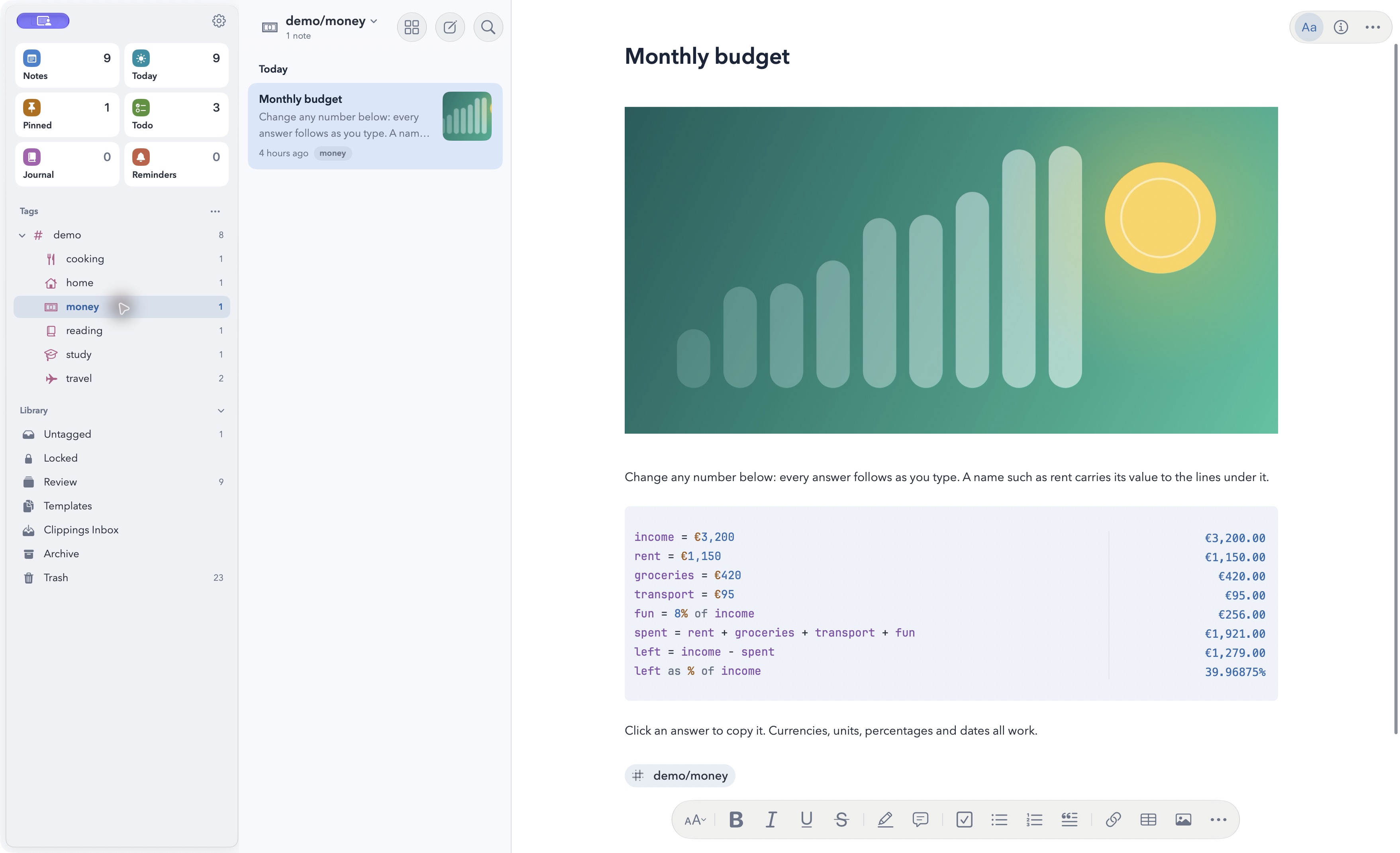
Your notes. On your terms.
Private by design
No Varlig account. Notes stay on your devices or in your own iCloud. Password-protected notes and their attachments are encrypted.
Explore privacy controlsReady when you’re offline
Write, search and calculate with numbers and units offline. Sync and live data need a connection; downloaded exchange rates still work.
See what needs a connectionEasy to bring. Easy to take.
Import from Bear or Soulver on your Mac. Export your notes as Markdown, PDF, HTML or Word whenever you need them.
Explore import and exportAt home on Mac, iPhone and iPad
Write and calculate on all three devices. Sync through your own iCloud to pick up where you left off.
Get started on iPhone and iPad
QUESTIONS
Good questions.
Still curious? The Varlig Guide explains every feature, with examples you can copy.